Send an invoice in CrewHub360 and it lands in Zoho Books with every line item and your own invoice number. Collect the payment and it's recorded there too. Record a check in Zoho Books and CrewHub360 sees it. Nobody retypes a thing.
If your books live in Zoho Books and someone is copying invoices and payments over from the field by hand, CrewHub360 takes that job off their plate. Your crew works in the field app, and your books keep up on their own.
When you send an invoice, CrewHub360 pushes it to Zoho Books with each line's name, description, quantity, and rate, keeps your CrewHub360 invoice number, and marks it sent so it counts in your books right away. The customer is created in Zoho Books with their first invoice.
A card or bank payment collected in CrewHub360 goes to Zoho Books against the right invoice, with the payment mode you chose for it, Zelle and your own custom modes included. And when someone records a payment in Zoho Books, it comes back into CrewHub360, so the invoice is paid in both places.
Choose your Zoho Books sales tax and your tax exemption once. Taxable lines go over with your tax, everything else with the exemption, and Zoho Books works out the tax at its own rate. If the total there would come out different from yours, the sync log says so, so nothing slips by.
Sales tax
Calculated by Zoho Books at your rate
Syncs run in the background, so nobody waits on Zoho Books while they work, and they pace themselves to stay inside Zoho's limits. A temporary error retries on its own. Every attempt lands in the accounting sync log with its status, so you always know what made it across.
Zoho Books sync
Books stay current automatically
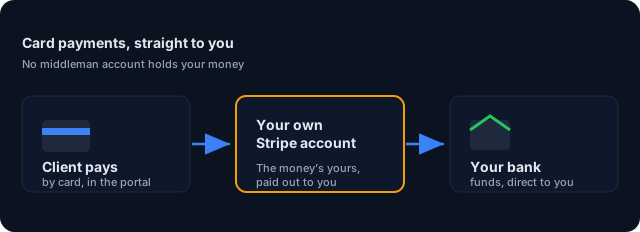
Stripe Connect direct billing. Payments go to your own account and on to Zoho Books.
Learn more →On QuickBooks Online instead? Two-way sync for customers, items, invoices, payments, and more.
Learn more →Customers view quotes, approve work, and pay invoices online from their own portal.
Learn more →Invoices, payments, and the customers they belong to. An invoice goes to Zoho Books when you send it, with its own line items and your CrewHub360 invoice number, and each payment goes over when it succeeds. The customer is created in Zoho Books with the first invoice, and you can send a customer's updated details from their page with one click.
For payments, yes. Once you add the CrewHub360 webhook in Zoho Books (a one-time step the settings page walks you through), a payment you record against an invoice in Zoho Books comes back into CrewHub360 and the invoice there shows it. Other edits you make in Zoho Books stay in Zoho Books.
You pick your Zoho Books sales tax and your tax exemption once in settings. Taxable lines carry your tax and the rest carry the exemption, and Zoho Books works out the tax at its own rate. If a total would come out different in Zoho Books, the sync log tells you.
Save the edit in CrewHub360 and the invoice in Zoho Books is updated to match. A save that changes nothing Zoho Books holds, like an internal note, leaves it alone.
No. Each account connects one accounting system, so your books never get two copies of the same invoice. Pick Zoho Books in the Accounting step when you set up your account.
QuickBooks Online also syncs your price book items, credit memos, and bills, and picks up customer changes made in QuickBooks. The Zoho Books sync covers invoices, payments, and customers. A voided invoice should also be voided in Zoho Books by hand.
14-day free trial. Choose Zoho Books when you set up your account, included on every plan.
Start Your Free Trial