Roofing: residential & commercial

Roofing contractor software from inspection to final invoice.

Multi-phase job tracking, crew dispatch with GPS time, photo documentation, digital signatures, and online invoicing with automatic QuickBooks sync. CrewHub360 handles the paperwork so your crews can focus on the roof.

Roofing contractors running 2+ crews

Residential replacements, commercial re-roofs, storm damage, repairs, and inspections. Whether you run a single crew or coordinate multiple teams across projects, CrewHub360 tracks every phase, documents every visit, and gets you paid faster.

Residential replacement Commercial re-roof Storm damage & repair

Multi-phase jobs: inspection → install → cleanup

Roofing jobs don't happen in one visit. CrewHub360 structures each job as a sequence of visits — inspection, tear-off, install, cleanup, final walk — each with its own crew assignment, checklist, and completion status. The dispatch board shows all visits for every active job so nothing slips between phases.

  • Multiple visits per job, each with distinct type and checklist
  • Crew assignment per visit — match the right team to each phase
  • Visit status tracking: scheduled → en route → on-site → complete
  • Dispatch board shows full job sequence at a glance
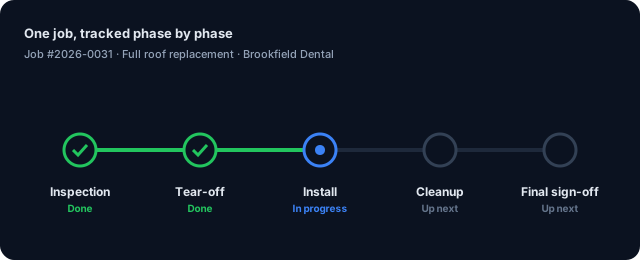
A roofing job tracked across phases: inspection, tear-off, install, cleanup, sign-off

Crew dispatch and GPS time tracking

Assign crews to visits from the dispatch board. Technicians clock in and out from the mobile app with GPS coordinates recorded at each event. The live map shows every tech's current location so you always know who's on which site. Time entries feed directly into job costing and payroll — no double entry.

  • Crew assignments per visit from the drag-and-drop board
  • GPS clock-in / clock-out on the mobile app
  • Live tech locations on the dispatcher map
  • Time entries roll up to job costing and payroll automatically
The whole roofing crew assigned on one live dispatch board
The whole crew on one live board

Quotes, invoices, and online payments

Quote from the job scope, convert to a job in one click, and invoice the moment work is complete. Clients receive an invoice email with a pay-online link — card payments land in your bank account directly. Every payment syncs to QuickBooks automatically. No more chasing checks or reconciling by hand.

  • Quote builder with line items, materials, labor, permits
  • One-click quote-to-job conversion
  • Pay-online portal link in every invoice email
  • Your customer's card pays straight into your own Stripe account — your money, no middleman
A quote with line items that converts straight to an invoice
Quote, invoice, and get paid online

Photo documentation and client sign-off

Before, during, and after photos — all tagged with GPS coordinates and timestamps and attached to the visit record. Clients sign off digitally on the mobile app at job completion. Signatures and photo sets are stored on the job and visible in the client portal, giving you a complete paper trail for every project.

  • Before/during/after photos with GPS + timestamp
  • Photos stored per visit and attached to the job record
  • Digital signature capture on mobile — no paper forms
  • Full photo and signature history visible in the client portal
The CrewHub360 mobile app capturing project photos and sign-off

For roofing contractors

Roofing software: common questions

Can I track multiple phases of a roofing job?

Yes. Each job can have multiple visits with distinct types — inspection, tear-off, install, cleanup, final inspection. Each visit has its own checklist, assignment, and completion status. The dispatch board shows all visits for a job in sequence.

How does invoicing work for roofing jobs?

Create an invoice from a job's line items — materials, labor, permits, disposal fees. Send it to the client via the portal with an online payment link. Payments sync to QuickBooks automatically.

Can I capture signatures and photos on the job?

Yes. The mobile app supports job photos tagged by type (before, during, after) with GPS coordinates and timestamps. Client signatures are captured on-screen and attached to the job record.

Does the mobile app work on a job site without signal?

Yes. CrewHub360 Field is built to work offline. Photos, checklists, time entries, and notes all save right on the phone and sync when signal is available. No more lost data from dropped connections.

How does QuickBooks sync work?

Invoices, payments, and customer records sync bidirectionally. Line items map to your QBO service items, tax codes pull from the service address jurisdiction, and payments post to the correct bank account automatically.

Try roofing contractor software for 14 days

Free trial. No credit card. Multi-phase jobs, crew dispatch, and online billing ready on day one.

Start Your Free Trial