Multi-trade job scheduling, subcontractor management, real-time job costing, progress billing, and bidirectional QuickBooks sync. CrewHub360 keeps your projects on schedule and your books accurate without the spreadsheet juggling.
Residential remodels, commercial tenant improvements, multi-phase builds, and specialty subcontractor coordination. Whether you self-perform or sub everything out, CrewHub360 tracks who's on site, what it costs, and how close you are to your estimate — in real time.
A single job can span weeks and a dozen trades. CrewHub360 structures each job as a sequence of visits — one per trade, per phase — each with its own crew assignment, skill requirements, checklist, and completion status. The dispatch board filters by trade or skill so you always see what's scheduled, what's active, and what's overdue.
Subcontractors live in the vendor register as a distinct type. Assign them to job visits, track their invoices and expenses against the job, and pull 1099 totals at year-end without digging through spreadsheets. Purchase orders to subs are linked to the job for full cost visibility in one place.
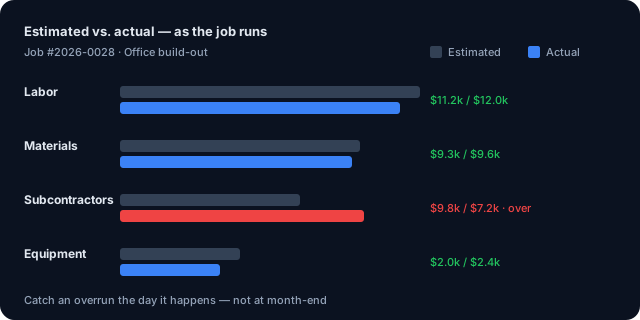
Know your margin before the project closes — not after. Job costing compares your original estimate against actual labor from time entries, materials from inventory transactions and purchase orders, and subcontractor expenses. The job detail screen shows the running total so you can catch overruns while there's still time to act.
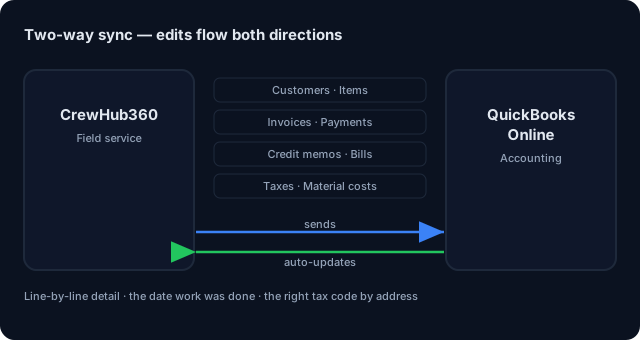
Bill at every milestone — deposit, rough-in, completion, or any split that fits your contract. Each invoice links to the job, goes out via the client portal with a pay-online link, and syncs to QuickBooks the moment payment clears. Bidirectional sync means your books stay accurate without anyone touching QBO manually.
Multi-trade visits, skill-based assignment, live GPS dispatch — all on one board.
Learn more →Progress billing, online invoicing, pay-by-card portal links — the card pays straight into your own Stripe account.
Learn more →Two-way QBO — invoices, payments, bills, material costs, and tax codes fully automated.
Learn more →Yes. Subcontractors are tracked in the vendor register as a distinct vendor type. You can assign them to jobs, track their expenses, and generate 1099 records at year-end.
Jobs can have multiple visits — one per trade, each with its own crew assignment, checklist, and status. The dispatch board shows all active visits across all jobs, filterable by trade or skill.
Yes. Job costing compares estimated vs. actual labor (from time entries), materials (from inventory transactions and purchase orders), and subcontractor expenses — all on the job detail screen.
Create invoices at any project milestone — deposit, mid-point, completion. Each invoice links to the job and syncs to QuickBooks. The client pays via the portal link; payments post to QBO automatically.
Yes. Two-way sync: customers, service items, invoices, payments, credit memos, and bills all sync. Tax codes pull from the service address jurisdiction. Material cost entries are created for materials used.
Free trial. No credit card. Multi-trade scheduling, job costing, and QBO sync ready on day one.
Start Your Free Trial